Minecraft 1.16.1 · Fabric
Download BoardRaid
You can also grab just the mod file (.jar); but we recommend the modpack — it already ships every optimization mod we allow, so the game runs smoother.
Download too slow or stuck? Try the backup mirror (Hong Kong)
Update · Locked Out
One-click updater: no modpack reinstall
If the game says "Your client is out of date; download the latest from the official site and restart the game", the server wants a newer version and the copy you have can't get in anymore. Update with the little tool below: it needs neither the game nor a launcher, it finds the mods folder itself, downloads the latest version, verifies it and swaps it in.
- Step 1 · Download: put both files above into the same folder (your browser may stop the .cmd and ask about it — just choose "Keep").
- Step 2 · Double-click
boardraid-updater.cmd: it lists the mods folder it found and asks you to confirm. When it finds none (PCL / HMCL / a custom modpack folder), drag your game folder or mods folder into that black window and press Enter to point it there. - Step 3 · Restart the game: if you see
[OK] installed ...and "Done", it worked. The old version is renamed to.disabledand kept in mods (so you can roll back); once the new version runs, the client cleans it up itself.
It does only three things: read version.json → download and verify the sha256 →
put it in the mods folder. If the check fails it does nothing at all, so the install you have now keeps working;
and it only touches packages with boardraid in the file name, never other mods.
Launcher
Pick a launcher to import the modpack with
There are many Minecraft launchers. Here we walk through the import with PCL and MultiMC; other launchers do it much the same way.
Route A
Import the modpack in PCL
Four steps, just click along; tap a screenshot to see it full size.
-
 01
01Put the downloaded
BoardRaid.zipsomewhere, don't unpack it — the steps below pick the archive itself. -
02
Open PCL and click Version Selection (版本选择) in the bottom-left corner. If you never installed a game the middle shows "No versions available" — ignore it — the modpack is imported from this page.

-
03
In the left-hand list click Import Modpack (导入整合包), then in the window that opens pick
BoardRaid.zip.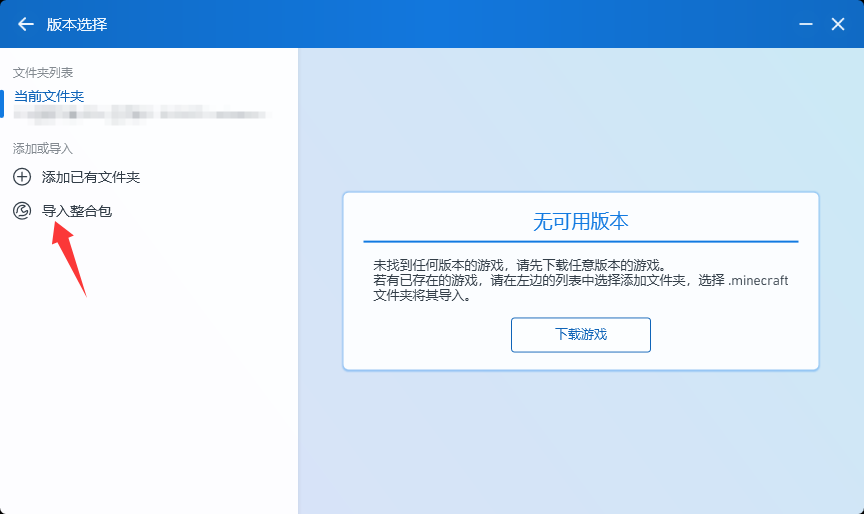
-
04
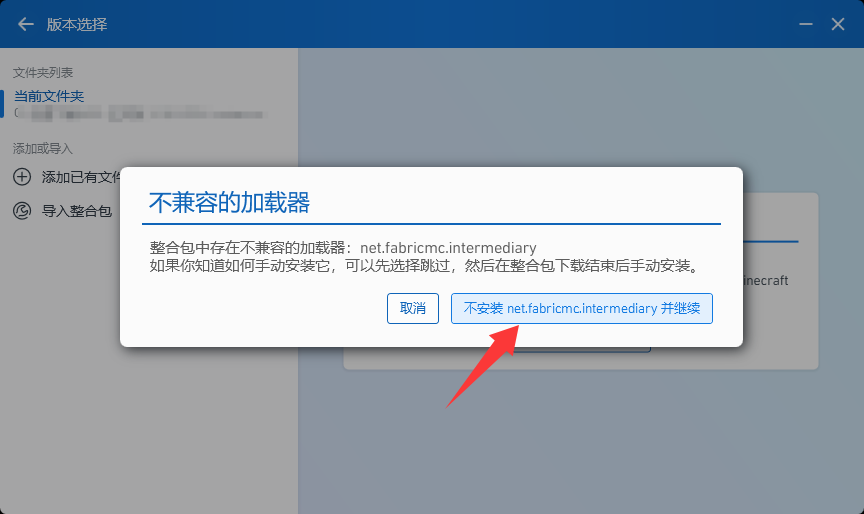
If the Incompatible Loader (不兼容的加载器) dialog pops up while importing, click Don't install net.fabricmc.intermediary and continue (不安装 net.fabricmc.intermediary 并继续). That entry is a mapping table, not a loader — PCL misreads it, and skipping it doesn't affect the game. When the progress bar finishes, go back to the main screen, select the instance you just imported and click Launch.
Route B
Import the modpack in MultiMC
Three steps; tap a screenshot to see it full size.
-
 01
01Same here: have
BoardRaid.zipready and don't unpack it. -
02
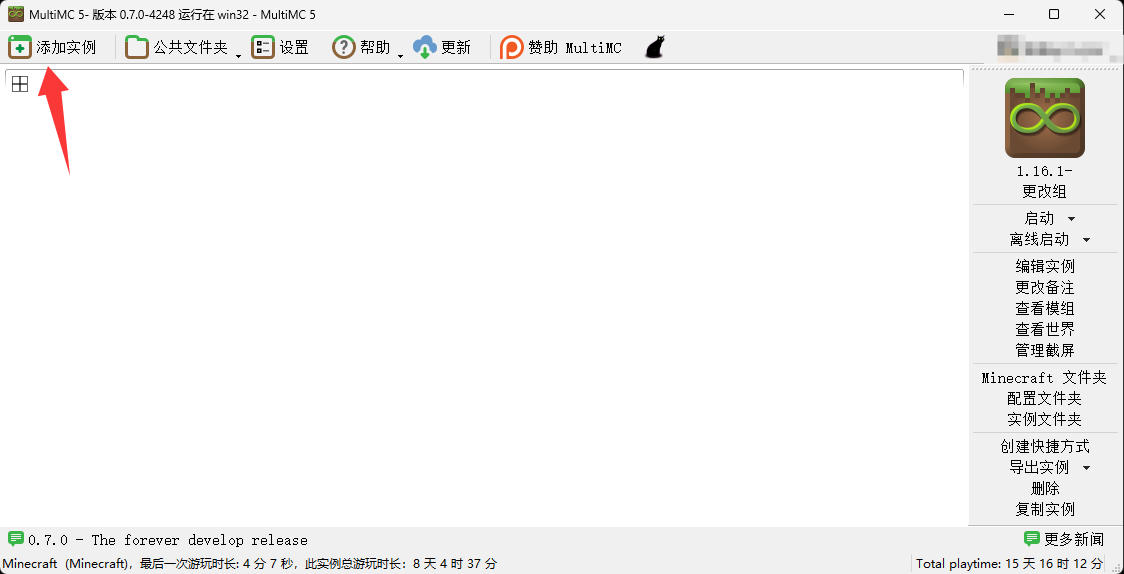
Open MultiMC and click Add Instance (添加实例) in the top-left corner.
-
03
On the left of the dialog pick Import from Zip (导入 Zip 压缩包), then click Browse (浏览) on the right, choose
BoardRaid.zipand finally click OK. When the import finishes, select the instance and click Launch.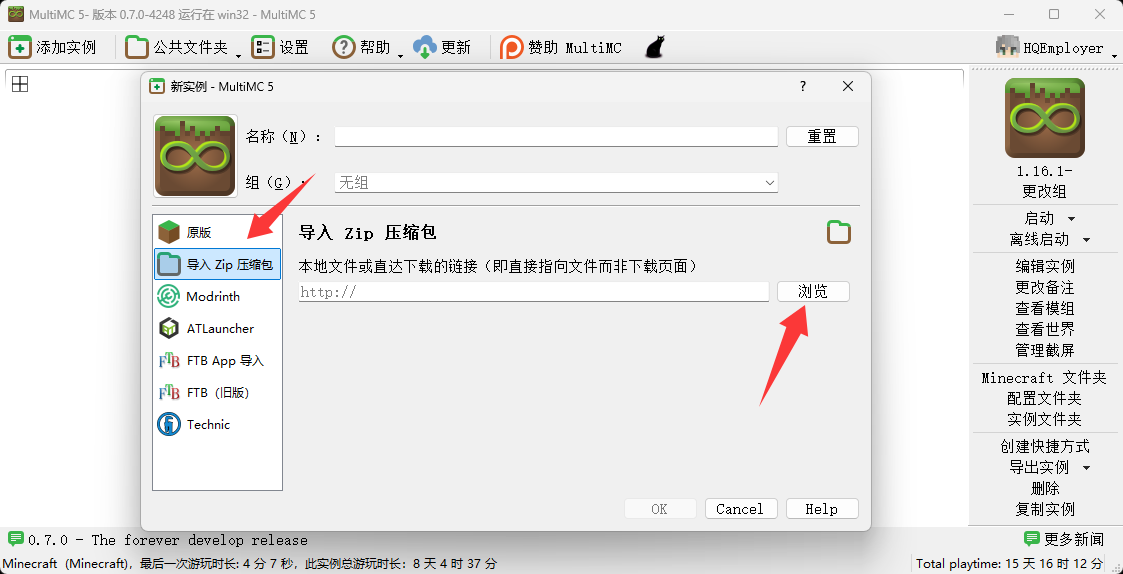
Just the jar
If you only download the mod file, watch these points
The modpack already ships every part of the environment listed below.
- Minecraft 1.16.1 (Java Edition)
- Fabric Loader (0.18.4+)
- Speedrun API or Fabric API (either one)
Glacier in the modpack requires Fabric Loader 0.18.4 or newer (it needs MixinExtras 0.5.0). Install it with an older Loader and dependency resolution refuses to start at once, and all you see is one English error line. With BoardRaid as your only mod, 0.14 or newer is enough.
They provide the key-binding-api the mod uses to register key bindings, so either one of them is enough.
FAQ
If something breaks, look here first
Why won't my instance start normally?
Read the error text the launcher shows first — in nine cases out of ten the reason comes straight out of it. These three are the most common:
① The Java version is out of range. 1.16.1 officially asks for Java 8, but in practice Java 8 ~ 20 all reach the client fine — you don't have to stay on Java 8; check which version your launcher settings use.
② A missing API mod. Install Speedrun API or Fabric API, either one works (see the "Just the jar" section above).
③ The maximum allocated memory is under 1 GB, or the graphics driver is too old. Set the maximum memory to 2 GB or more.
The mod is already in mods, but I still can't get into the client in-game?
This is usually not "it didn't install" — it's that the client self-check didn't pass — before you enter BoardRaid it runs one check, and if something is wrong it lists the reasons right there:
① You installed a mod that isn't on the whitelist. If you try to enter the client with a mod that isn't allowed, it tells you which mods aren't allowed and asks you to delete them — remove those jars as prompted and restart.
② You get into the game but can't see the client entry (the trident icon). Fabric Loader probably didn't load properly: check that Fabric Loader starts up fine and that its version meets the standard (0.18.4+, you can see the Fabric marker in the top-left of the launcher).
Still can't play the game normally?
If you're stuck and can't fix it, join our QQ Group 1082585392 or the Oopz channel 936964348 and ask there.
Post the launcher's error text or a screenshot of it — that helps us track down the cause faster-W-.